How to Use a Blackbook: When to Add and Drop a Horse
A blackbook stops you missing the horse you meant to follow. Here's when to add a horse, what to write, when to drop it, and how to use the free QTR Blackbook.
Every punter has a horse they meant to follow. It got held up at Caulfield, you thought "next time", and three weeks later it won at $12 while you were looking at a different race. A blackbook is how you stop that happening.
I've had a Blackbook on QTR for a while, but it was tucked away for paid members only. As of this week it's free with any QTR account, and it's much easier to find. Here's how I'd use it.
What is a blackbook?
A blackbook is your own list of horses to follow. Each one goes in because a run was better than the result shows, with a note on why. When the horse comes up again, you're reminded what you saw and what it needs.
It's one of the oldest habits in racing for a reason. A finishing position only tells you where a horse crossed the line, not how it got there. Your note keeps the bit the form line leaves out.
Why it's worth the effort
- You stop relying on memory. Nobody remembers every eye-catcher across a full Saturday, let alone a month of them.
- You bet with a reason. When the horse comes up, you already know why you like it and what conditions suit it.
- You stay patient. A blackbook horse isn't an automatic bet. You wait for the race that suits it.
- You stop repeating mistakes. The "do not back again" list is just as valuable as the follow list.
New to QTR? Sign up free and get 7 days of full access: my ratings, speed maps and race summaries for every race. No card needed.
Sign up freeWhen to add a horse
I add a horse when its run was clearly better than its finishing position. The common reasons:
- Held up or no clear run in the straight, and it was still running on at the line.
- Slow out of the gates or bumped at the start, then made up a lot of ground.
- Wide with no cover for most of the race and still held its ground.
- Raced against the pattern, such as getting back on a day the leaders kept going, or racing off the fence when it was the place to be.
- Wrong conditions, such as a horse bred for 1600m running over 1200m, or a wet-tracker on a firm track.
- First or second up from a spell and running well while it was still short of its peak.
- A gear change, a new stable or a better jockey booking coming up.
- A strong barrier trial from a horse you already had your eye on.
Don't add a horse just because it won. Everyone saw that, and the price will show it. The best entries are the ones the market might miss.
What to write in the note
A good note is short and specific. It should answer two questions: what happened and what does it need next time?
Held up in the straight at Caulfield, home late. Wants 1600m+.
Slow out and wide with no cover. Did plenty late. Wants a wet track.
Distance, track condition, barrier, track direction and the price you'd take are all worth jotting down. "Ran well" isn't. You'll have forgotten what you meant by the time it races again.
When to drop a horse
A blackbook only works if you prune it. I drop a horse when:
- It got its chance and didn't take it. It had the conditions you wrote down and a clear run, and still didn't run up to it.
- Two or three runs have gone by and the excuse hasn't shown up again. Maybe it wasn't as good as it looked.
- The excuse is the horse. If it misses the start every time or over-races every run, that's not bad luck, it's a habit. Tick Do not back again.
- The market has caught on. If everyone saw the same run, the price can end up shorter than the horse's real chance. Members can check my rated price on its upcoming runs before deciding.
- It's gone for a spell, changed stables or been retired. Add it back when it returns if it's still worth following.
Have a quick clean-up once a month. A list of 15 well-chosen horses is far more useful than 80 you'll never check.
How to use the Blackbook on QTR
Add a horse
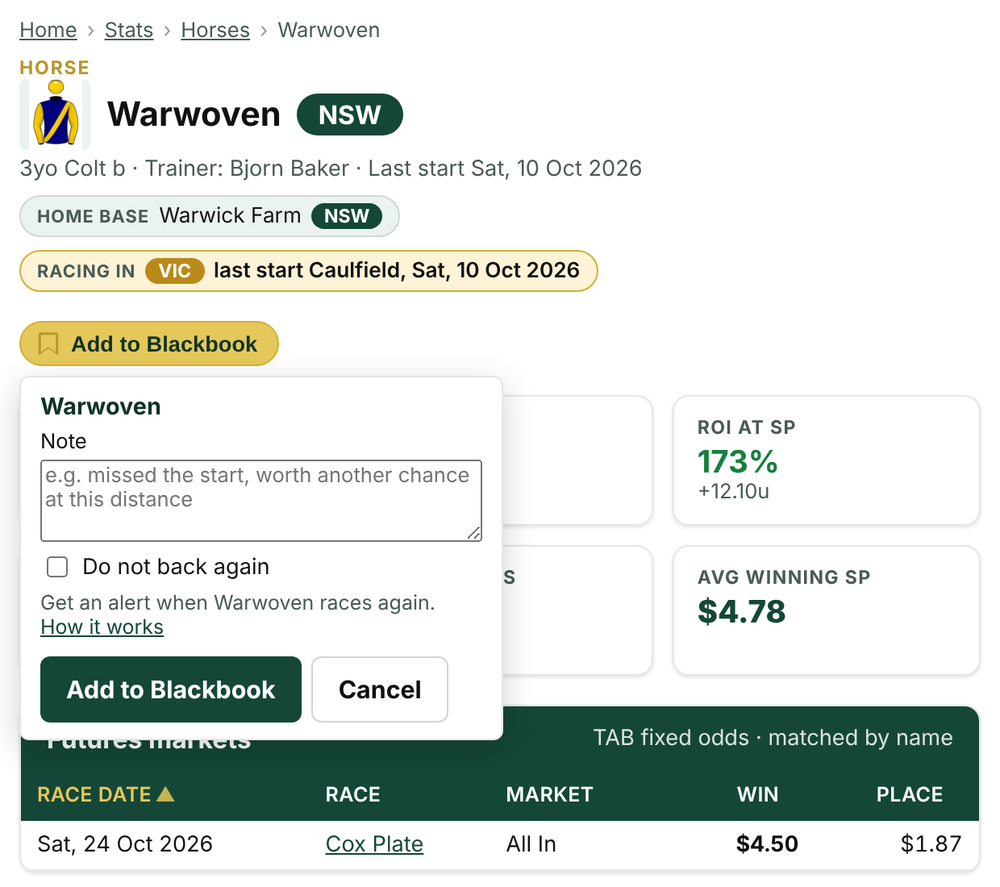
Look for the gold bookmark next to a horse's name. It's on the Best Bets page, on every horse's Stats profile (as an Add to Blackbook button) and, for members, on the race cards. Click it, write your note, tick Do not back again if that's what it is, and click Add to Blackbook.
If you're not signed in, the same button lets you create a free account in a few seconds.
Get the alert
When one of your horses is in today's races, it shows in the bell at the top of the page under Blackbook - racing today. The bookmark also fills in wherever the horse appears, so you'll spot it on Best Bets or a race card without hunting.
Keep it up to date
Open My Blackbook from the menu under your name. You'll see every horse, when you added it, your note and its next start.
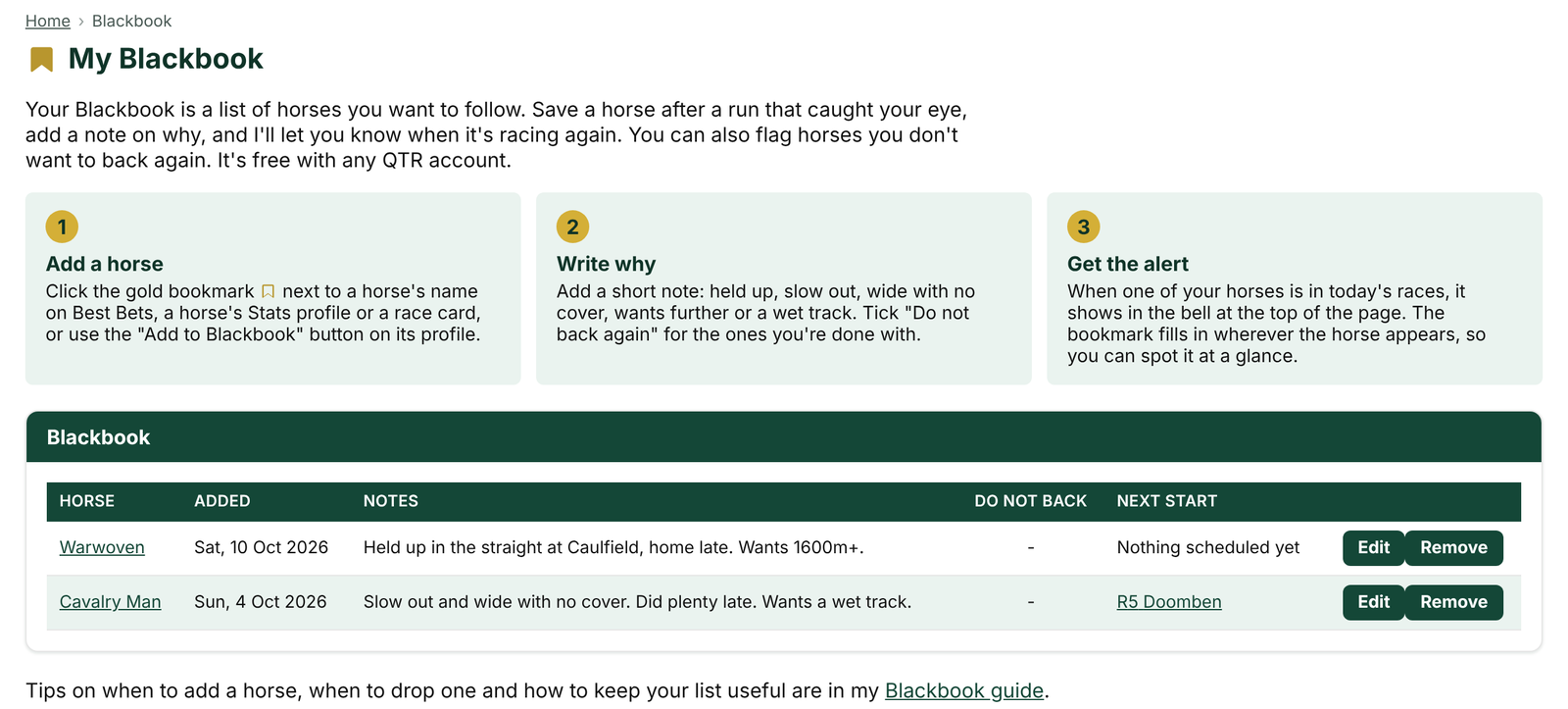
- Edit to update the note after each run. Add what happened, so the note builds into a short history.
- Remove to drop a horse, or click its gold bookmark anywhere on the site and choose Remove.
- Click the horse's name to open its Stats profile, with its form by distance, track condition and barrier. That's the quickest way to check whether today's race suits it.
A simple routine
- Saturday night or Sunday: go through the weekend's results and add the two or three runs that stood out, with a note on each.
- Race morning: check the bell. If a blackbook horse is racing, compare the race against your note. Right distance? Right track? Decent barrier?
- After it runs: update the note, or drop it if it had its chance.
- Once a month: clear out anything that's had three runs without showing you anything.
Start yours
Head to My Blackbook to start, or open any horse in Racing Stats and click Add to Blackbook. It's free with a QTR account. If you want my ratings and rated prices alongside it, have a look at what's included.
18+ · Gamble responsibly · Gambling Help 1800 858 858 · gamblinghelponline.org.au · BetStop
Frequently asked questions
What is a blackbook in horse racing?
It's your own list of horses to follow, each with a note on why. You add a horse when its run was better than the result shows, so you're reminded what it needs when it races again.
When should I add a horse to my blackbook?
When a run was clearly better than the finishing position: held up, slow away, wide with no cover, raced against the pattern, wrong distance or track, or first-up and still short of its peak.
When should I drop a horse from my blackbook?
When it got the conditions you wrote down and still didn't run up to it, when two or three runs pass without the excuse showing up, or when the excuse turns out to be a habit. Flag those as Do not back again.
Is the QTR Blackbook free?
Yes. Any QTR account, free or paid, can add horses, keep notes and get an alert in the bell when a horse is racing today.
Get 7 days of full access, free
Sign up free and every feature is unlocked for your first 7 days. No card needed.
- My ratings, speed maps and race summaries for every race
- Ratings Lab, My Assessment and custom speed maps
- QTR Futures for the big races ahead
- Form tools, head to head, trainer patterns and the Statistics tab
Read next
 GuideHow to Read a Horse's Recent Form on QTROpen any runner on a QTR race page to see its last 10 starts. Here's how I read recent form, column by column, and the five things I look for.
 GuideQTR for Every Punter, From Saturday Bets to Full FormSaturday punter or form student, here's what QTR has for you: free Best Bets and Racing Stats, a free Blackbook, and ratings and previews for every race.
 What's newMy Bankroll: Your Bank, Every Bookmaker, One PageMy Bankroll keeps your whole bank in one place across every bookmaker, works out your stake for each race and updates itself as your bets settle.